
Federated APIOps with Kong · Part 3. A bonus part. Part 1 is the design, Part 2 the pipelines. This part lets people sign in to Kong Manager with Keycloak. The code is in kong-federated-apiops.
Kong Manager with Keycloak lets a person’s Keycloak group decide which workspace they can read. In Part 2, each team’s people get the workspace-read-only role in their own workspace, so they can look in Kong Manager but change nothing. Someone still has to give them that role, and take it away when they move teams. I’d rather the identity provider did that than the platform team, one ticket at a time.
On my first attempt the token Keycloak hands Kong carried plain group names (payments-read-only), matched to Kong groups of the same name. With enforce_rbac = on that worked. With enforce_rbac = both, which Part 2 needs, every page answered 403, even in the person’s own workspace. The format Kong documents, <workspace>:<role>, worked with both.
At a glance
- You get: no role tickets. A Keycloak group decides who reads which workspace, and a group change takes effect at the person’s next sign-in.
- The rule: the token carries
payments:workspace-read-only, theWORKSPACE_NAME:ROLE_NAMEformat. - You need: self-managed Kong Gateway Enterprise (Kong Manager sign-in and RBAC are Enterprise features) and the Part 2 lab running: Docker, mise, a license file, then
make up(Part 2, step 1).
How Kong Manager maps Keycloak groups to workspace roles
Kong Manager reads the claim named in authenticated_groups_claim from the token Keycloak issues. Each value must be <workspace>:<role>, for example payments:workspace-read-only. At the first sign-in Kong creates the admin and gives it that role; at every later sign-in the claim replaces the roles the IdP gave before.
Kong’s docs say you can “map identity provider (IdP) groups to Kong roles”, and that “admin accounts are created automatically”. Before pay-reader first signed in, Kong had no admin of that name; afterwards it had one with the payments role. The platform team still creates only the roles, with Terraform as in Part 2.
Step 1: Run it
Versions used: Kong Gateway Enterprise 3.16.0.3 · Keycloak 26.8.2
make sso
make sso starts Keycloak, loads the lab realm (Keycloak’s name for one set of users, groups and apps) from lab/keycloak/lab-realm.json, and switches Kong Manager in the dev environment to OpenID Connect with the settings in lab/compose.sso.yaml. Steps 2 and 3 show what those two files hold. Then it runs tests/sso.sh:
== 1. A payments person (Keycloak group payments-read-only)
PASS  signs in through Keycloak -> 302
...
PASS  Kong created the admin at first sign-in
PASS  reads payments -> 200
PASS  can't create a service in payments -> 403
PASS  can't read orders -> 403
...
14 passed, 0 failed
To sign in yourself, open http://127.0.0.1:18002, click Continue and sign in as the pay-reader user that make sso lists, with the SSO_USER_PASSWORD from .env. The team and platform tokens from Part 2 still work on the Admin API, so the Part 2 workflows keep running.
Step 2: Put the Kong role on the Keycloak group
In Keycloak, Kong Manager is a client (the app people sign in to), and a client can have its own roles. The payments-read-only group gets the client role payments:workspace-read-only, named exactly like the Kong role, and a protocol mapper on the client copies the person’s client roles into the token as a kong_roles claim. From lab-realm.json (excerpts):
"groups": [{
  "name": "payments-read-only",
  "clientRoles": {
    "kong-manager": ["payments:workspace-read-only"]
  }
}]
"clients": [{
  "clientId": "kong-manager",
  "protocolMappers": [{
    "protocolMapper": "oidc-usermodel-client-role-mapper",
    "config": {
      "usermodel.clientRoleMapping.clientId": "kong-manager",
      "claim.name": "kong_roles",
      "multivalued": "true",
      "id.token.claim": "true"
    }
  }]
}]
That split is what fixed my 403. People see a group called payments-read-only, and Kong gets the string it parses.
Step 3: Set admin_gui_auth_conf for Keycloak
Kong Manager’s OIDC settings go in admin_gui_auth_conf, with admin_gui_auth = openid-connect, in kong.conf or as KONG_ environment variables on the nodes that serve Kong Manager. The lab sets them in lab/compose.sso.yaml; this excerpt leaves out scopes, admin_auto_create, admin_auto_create_rbac_token_disabled and session_secret:
{
  "issuer": "http://keycloak:8080/realms/lab/.well-known/openid-configuration",
  "client_id": ["kong-manager"],
  "client_secret": ["<from .env>"],
  "redirect_uri": ["http://127.0.0.1:18001/auth"],
  "login_redirect_uri": ["http://127.0.0.1:18002"],
  "logout_redirect_uri": ["http://127.0.0.1:18002"],
  "admin_claim": "email",
  "authenticated_groups_claim": ["kong_roles"],
  "cache_tokens": false
}
admin_claimbecomes the admin’s username in Kong, so pick a claim that doesn’t change.issuerhere is Keycloak’s discovery URL; Kong reads the real issuer from it.authenticated_groups_claimnames the claim Kong reads the roles from, herekong_roles.redirect_uripoints at the Admin API’s/authon port 18001, not Kong Manager on 18002. Kong’s docs ask for “an array of URLs that points to Admin API’s authentication endpoint”.
Inside Docker, Kong reaches Keycloak at keycloak:8080; your browser reaches it at 127.0.0.1:18080. I first sent the browser to 127.0.0.1:18080 by overriding authorization_endpoint, as Kong’s Docker quickstart does. The sign-in got through Keycloak, then Kong answered 401 and logged issuer mismatch. Keycloak’s callback named 127.0.0.1:18080 as the issuer, while Kong had discovered keycloak:8080. Setting KC_HOSTNAME=http://127.0.0.1:18080 gave Keycloak one issuer for both, and KC_HOSTNAME_BACKCHANNEL_DYNAMIC=true lets Kong’s server-to-server calls (the back channel) keep using keycloak:8080. Keycloak needs KC_HOSTNAME as a full URL for that.
Step 4: Try it
tests/sso.sh signs people in with a password on /auth, which Kong exchanges at Keycloak (a password grant, enabled on the lab’s client for the test only). That’s how Kong Manager’s own tests sign in without a browser. It then tries each workspace:
| Who | payments | orders |
|---|---|---|
pay-reader (group payments-read-only) | read 200, create 403 | 403 |
ord-reader (group orders-read-only) | 403 | read 200 |
no-group | 403 | 403 |
pay-reader, after moving to orders-read-only and signing in again | 403 | 200 |
The move didn’t show up at first. With the default cache_tokens (true), the second password sign-in kept the old role. With cache_tokens: false it picked up the change; I take it Kong had reused the cached token response. Kong created the admins at their first sign-in, and nobody gave a person a role in Kong.
I checked the browser path once, as pay-reader:
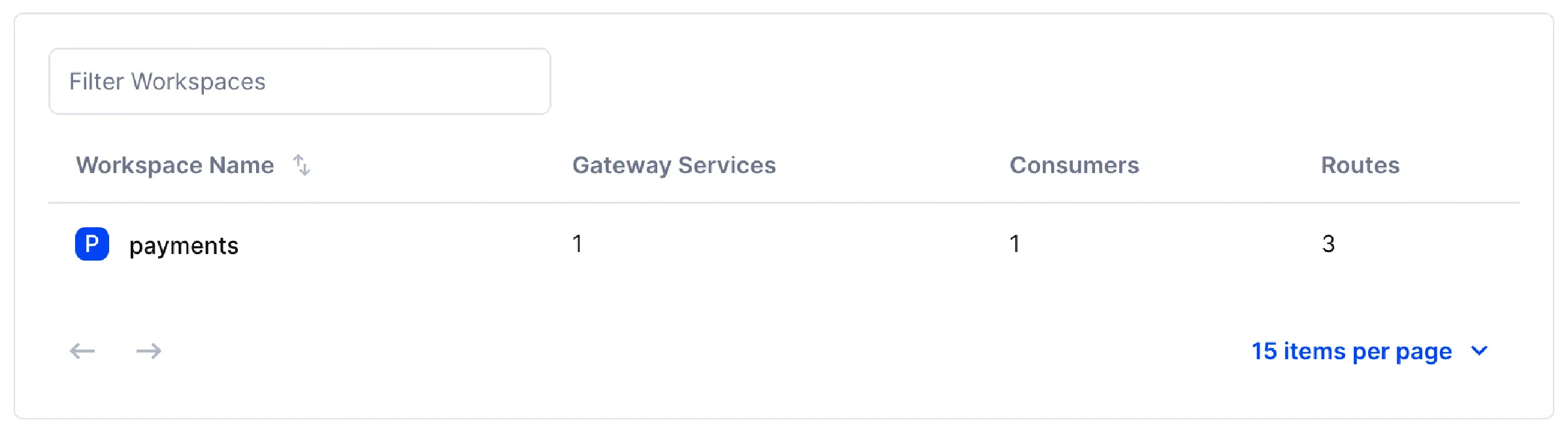
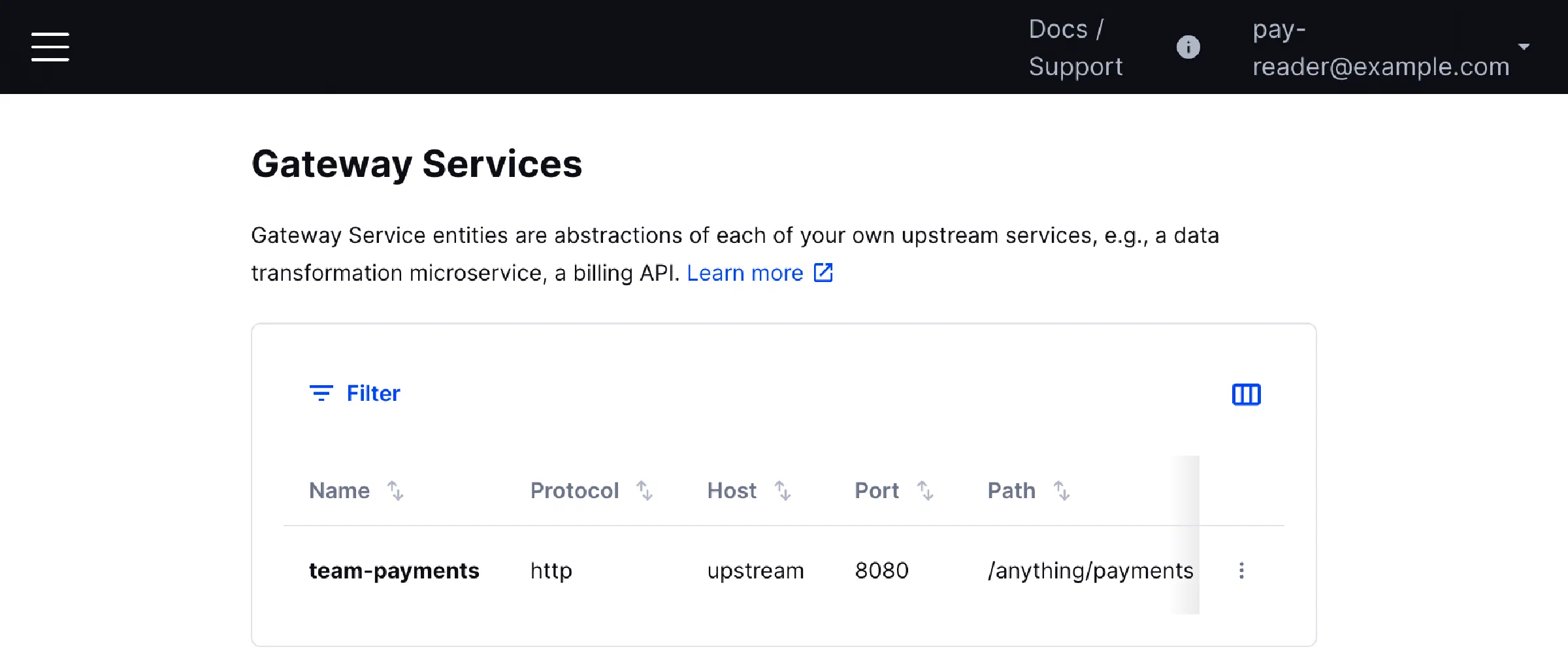

In production
- Keep a break-glass identity outside the IdP. Kong Manager now signs in only through Keycloak, so keep the super admin’s RBAC token for the Admin API.
- Put TLS on the Admin API and Kong Manager and set
session_cookie_securetotrue; Kong’s docs say “We recommend setting this value totruewhen using HTTPS.” - Make Kong trust Keycloak’s certificate with
lua_ssl_trusted_certificate, “so that the IdP’s server certificate is trusted by Kong Gateway”. - Keep the client secret in your secret store and pass it in as an environment variable, not in
kong.confin Git. Setsession_secrettoo: without it “A randomly generated secret will be used”, so sessions don’t survive a restart. - Turn off the password grant (Direct Access Grants) on the Keycloak client; only the test needs it.
- Don’t assign roles to people in Kong as well: “any changes will be overwritten by the IdP during the next login.”
Write roles map the same way (payments:<a role you create>). Not covered here: session lifetime and forced logout, other identity providers (their claim names differ), and Konnect, which has its own sign-in.
Troubleshooting
| You see | Fix |
|---|---|
401 after Keycloak, issuer mismatch in the Kong log | Give Keycloak one public hostname (KC_HOSTNAME) and let Kong use the back channel. |
Keycloak: Offline tokens not allowed for the user or client | Kong requests the offline_access scope, and Keycloak issues it only to users with the offline_access role. Giving users default-roles-lab fixed it in my realm. |
403 on every page with enforce_rbac = both, even the person’s own workspace | Use the documented <workspace>:<role> claim format instead of group names. |
| A group change doesn’t take effect when a script signs in again with a password | Set cache_tokens to false (default true). |
Clean up
make clean